除了使用SQL关系数据库外,我们还可以使用Xcode中提供的核心数据来处理表结构数据,今天就让中国E盟技术频道带大家一起进入下文了解详解iOS应用开发中Core Data数据存储的使用吧,希望对你学习有帮助!
1.如果想创建一个带有coreData的程序,要在项目初始化的时候勾选中
2.创建完成之后,会发现在AppDelegate里多出了几个属性,和2个方法
@property (readonly, strong, nonatomic) NSManagedObjectContext *managedObjectContext;
@property (readonly, strong, nonatomic) NSManagedObjectModel *managedObjectModel;
@property (readonly, strong, nonatomic) NSPersistentStoreCoordinator *persistentStoreCoordinator;
- (void)saveContext;
- (NSURL *)applicationDocumentsDirectory;
Core Data数据持久化是对SQLite的一个升级,它是ios集成的,在说Core Data之前,我们先说说在CoreData中使用的几个类。
(1)NSManagedObjectModel(被管理的对象模型)
相当于实体,不过它包含 了实体间的关系
(2)NSManagedObjectContext(被管理的对象上下文)
操作实际内容
作用:插入数据 查询 更新 删除
(3)NSPersistentStoreCoordinator(持久化存储助理)
相当于数据库的连接器
(4)NSFetchRequest(获取数据的请求)
相当于查询语句
(5)NSPredicate(相当于查询条件)
(6)NSEntityDescription(实体结构)
(7)后缀名为.xcdatamodel的包
里面的.xcdatamodel文件,用数据模型编辑器编辑
编译后为.momd或.mom文件,这就是为什么文件中没有这个东西,而我们的程序中用到这个东西而不会报错的原因。
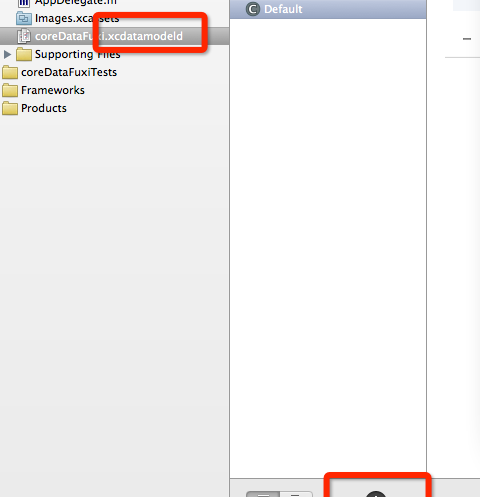
3.如果想创建一个实体对象的话,需要点击.xcdatamodel,Add Entity,添加想要的字段
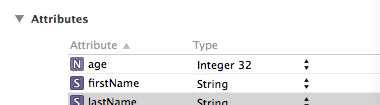
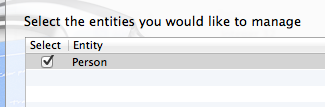
4.生成对象文件,command+n,然后选中CoreData里的NSManagerObjectSubClass进行关联,选中实体创建
5.添加数据
Person *newPerson = [NSEntityDescription insertNewObjectForEntityForName:@"Person" inManagedObjectContext:self.managedObjectContext];
if (newPerson == nil){
NSLog(@"Failed to create the new person.");
return NO;
}
newPerson.firstName = paramFirstName;
newPerson.lastName = paramLastName;
newPerson.age = [NSNumber numberWithUnsignedInteger:paramAge];
NSError *savingError = nil;
if ([self.managedObjectContext save:&savingError]){
return YES;
} else {
NSLog(@"Failed to save the new person. Error = %@", savingError);
}
NSEntityDescription(实体结构)相当于表格结构
6.取出数据查询
/* Create the fetch request first */
NSFetchRequest *fetchRequest = [[NSFetchRequest alloc] init];
/* Here is the entity whose contents we want to read */
NSEntityDescription *entity =
[NSEntityDescription
entityForName:@"Person"
inManagedObjectContext:self.managedObjectContext];
/* Tell the request that we want to read the
contents of the Person entity */
[fetchRequest setEntity:entity];
NSError *requestError = nil;
/* And execute the fetch request on the context */
NSArray *persons =
[self.managedObjectContext executeFetchRequest:fetchRequest
error:&requestError];
/* Make sure we get the array */
if ([persons count] > 0){
/* Go through the persons array one by one */
NSUInteger counter = 1;
for (Person *thisPerson in persons){
NSLog(@"Person %lu First Name = %@",
(unsigned long)counter,
thisPerson.firstName);
NSLog(@"Person %lu Last Name = %@",
(unsigned long)counter,
thisPerson.lastName);
NSLog(@"Person %lu Age = %ld",
(unsigned long)counter,
(unsigned long)[thisPerson.age unsignedIntegerValue]);
counter++;
}
} else {
NSLog(@"Could not find any Person entities in the context.");
}
7.删除数据
/* Create the fetch request first */
NSFetchRequest *fetchRequest = [[NSFetchRequest alloc] init];
/* Here is the entity whose contents we want to read */
NSEntityDescription *entity =
[NSEntityDescription
entityForName:@"Person"
inManagedObjectContext:self.managedObjectContext];
/* Tell the request that we want to read the
contents of the Person entity */
[fetchRequest setEntity:entity];
NSError *requestError = nil;
/* And execute the fetch request on the context */
NSArray *persons =
[self.managedObjectContext executeFetchRequest:fetchRequest
error:&requestError];
if ([persons count] > 0){
/* Delete the last person in the array */
Person *lastPerson = [persons lastObject];
[self.managedObjectContext deleteObject:lastPerson];
NSError *savingError = nil;
if ([self.managedObjectContext save:&savingError]){
NSLog(@"Successfully deleted the last person in the array.");
} else {
NSLog(@"Failed to delete the last person in the array.");
}
} else {
NSLog(@"Could not find any Person entities in the context.");
}
8.排序
NSSortDescriptor *ageSort =

[[NSSortDescriptor alloc] initWithKey:@"age"

ascending:YES];

NSSortDescriptor *firstNameSort =

[[NSSortDescriptor alloc] initWithKey:@"firstName"

ascending:YES];

NSArray *sortDescriptors = [[NSArray alloc] initWithObjects:

ageSort,

firstNameSort, nil nil];

fetchRequest.sortDescriptors = sortDescriptors;
注意ascending:YES 属性决定排序顺序
通过中国E盟技术频道小编介绍的内容,相信大家都有了一定的了解,想要了解更多的技术内容,请继续关注中国E盟技术频道吧!