软件绘图会消耗相当大的内存,但是由于项目需要还是要制作出,最近小编都在学习关于这方面的内容,下面就跟着中国E盟技术频道小编的步伐来简单介绍iOS下实现基本绘画板功能吧,希望对你学习有帮助!
简单介绍iOS下实现基本绘画板功能
代码部分
TouchView.h
#import
@interface TouchView : UIView
{
NSMutableArray *points;
NSArray *points_all;
CGContextRef context;
UIColor *paint_clr;
}
@property (strong,nonatomic) NSMutableArray *points;
@property (strong,nonatomic) NSArray *points_all;
@property (strong,nonatomic) UIColor *paint_clr;
@end
TouchView.m
#import "TouchView.h"
@implementation TouchView
@synthesize points, points_all, paint_clr;
- (id)initWithFrame:(CGRect)frame
{
self = [super initWithFrame:frame];
if (self) {
// Initialization code
paint_clr = [UIColor greenColor];
}
return self;
}
// Only override drawRect: if you perform custom drawing.
// An empty implementation adversely affects performance during animation.
- (void)drawRect:(CGRect)rect
{
// Drawing code
if ((!self.points) || (self.points.count return;
}
context = UIGraphicsGetCurrentContext();
//设置画笔粗细
CGContextSetLineWidth(context, 5.0f);
//设置画笔颜色
//[[UIColor blueColor]set ];
// [paint_clr set];
//CGContextSetStrokeColorWithColor(context, [[UIColor blueColor]CGColor]);
CGContextSetStrokeColorWithColor(context, [paint_clr CGColor]);
//画以前的轨迹
for (int j = 0 ; j NSMutableArray *points_tmp = [points_all objectAtIndex:j];
for (int i = 0;i {
CGPoint point1 = [[points_tmp objectAtIndex:i] CGPointValue];
CGPoint point2 = [[points_tmp objectAtIndex:(i+1)] CGPointValue];
CGContextMoveToPoint(context, point1.x, point1.y);
CGContextAddLineToPoint(context, point2.x, point2.y);
CGContextStrokePath(context);
}
}
//画这次
for (int i=0; i CGPoint point1 = [[self.points objectAtIndex:i] CGPointValue];
CGPoint point2 = [[self.points objectAtIndex:(i+1)] CGPointValue];
CGContextMoveToPoint(context, point1.x, point1.y);
CGContextAddLineToPoint(context, point2.x, point2.y);
CGContextStrokePath(context);
}
}
//不支持多点触摸
- (BOOL) isMultipleTouchEnabled
{
return NO;
}
//创建一个array,并且记录初始ponit
- (void) touchesBegan:(NSSet *) touches withEvent:(UIEvent *) event
{
self.points = [NSMutableArray array];
CGPoint pt = [[touches anyObject] locationInView:self];
[self.points addObject:[NSValue valueWithCGPoint:pt]];
}
//移动过程中记录这些points
//调用setNeedsDisplay,会触发drawRect方法的调用
- (void) touchesMoved:(NSSet *)touches withEvent:(UIEvent *)event
{
CGPoint pt = [[touches anyObject] locationInView:self];
[self.points addObject:[NSValue valueWithCGPoint:pt]];
[self setNeedsDisplay];
}
- (void) touchesEnded:(NSSet *)touches withEvent:(UIEvent *)event
{
NSMutableArray *points_tmp = [[NSMutableArray alloc] initWithArray:self.points];
if (self.points_all == nil) {
self.points_all = [[NSArray alloc] initWithObjects:points_tmp, nil];
}else {
self.points_all = [self.points_all arrayByAddingObject:points_tmp];
}
}
@end
ViewController.h
#import
@class TouchView;
@interface ViewController : UIViewController
{
TouchView *tv;
}
@end
ViewController.m
#import "ViewController.h"
#import "TouchView.h"
@interface ViewController ()
@end
@implementation ViewController
- (void)viewDidLoad
{
[super viewDidLoad];
// Do any additional setup after loading the view, typically from a nib.
self.view.userInteractionEnabled = YES;
// TouchView *tv = [[TouchView alloc]initWithFrame:CGRectMake(0.0f, 0.0f, 260.0f, 260.0f)];
tv = [[TouchView alloc]initWithFrame:self.view.frame];
tv.backgroundColor = [UIColor blackColor];
[self.view addSubview:tv];
UISegmentedControl *seg = [[UISegmentedControl alloc] initWithItems:[@"White Red Blue Green Yellow" componentsSeparatedByString:@" "]];
seg.segmentedControlStyle = UISegmentedControlSegmentCenter;
seg.tintColor = [UIColor blackColor];
seg.center = CGPointMake(self.view.center.x, (self.view.bounds.size.height - seg.bounds.size.height));
[self.view addSubview:seg];
[seg addTarget:self action:@selector(colorChange:) forControlEvents:UIControlEventValueChanged];
}
- (void)viewDidUnload
{
[super viewDidUnload];
// Release any retained subviews of the main view.
}
- (BOOL)shouldAutorotateToInterfaceOrientation:(UIInterfaceOrientation)interfaceOrientation
{
return (interfaceOrientation != UIInterfaceOrientationPortraitUpsideDown);
}
- (void) colorChange: (UISegmentedControl *) seg
{
switch ([seg selectedSegmentIndex])
{
case 0:
tv.paint_clr = [UIColor whiteColor];
break;
case 1:
tv.paint_clr = [UIColor redColor];
break;
case 2:
tv.paint_clr = [UIColor blueColor];
break;
case 3:
tv.paint_clr = [UIColor greenColor];
break;
case 4:
tv.paint_clr = [UIColor yellowColor];
break;
default:
break;
}
}
@end
效果图
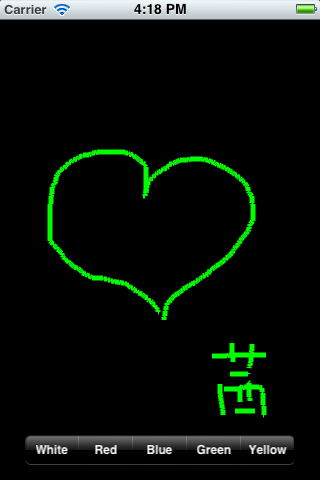
上文是中国E盟技术频道小编简单介绍iOS下实现基本绘画板功能,感兴趣的朋友们可以继续关注中国E盟技术频道哦!
+1
赞
赏
 分享
分享